Automate GoodLife & Joyride Bulk Enrollments
Accelerate your Hero GoodLife login, batch register customer VINs, and process daily enrollments 10x faster with zero data entry errors.
Hero GoodLife Login & Portal Access Guide
Direct portal links, dealer authentication instructions, login troubleshooting, and automated bulk registration for Hero MotoCorp authorized staff.
Official Hero GoodLife Portal
HMCL Official Portal VerifiedThe official portal for Hero GoodLife loginand dealership vehicle registrations is hosted on Hero MotoCorp’s enterprise portal infrastructure. Authorized dealership staff can access their account directly below.
hmclgoodlife.heromotocorp.biz/GoodlifeDLWeb/#/login- Supports Hero GoodLife Dealer Login credentials
- Access to Joyride AMC online registration forms
- GoodLife Member Tiers: Pro (₹199), Silver (₹299), Gold (₹399), Platinum (₹499)
- Real-time customer OTP validation & district dropdown mapping
Dealership Staff Login Steps
Quick 4-Step AuthenticationOpen Chrome Browser
Launch Google Chrome on your dealership workstation PC.
Enter Authorized Credentials
Input your Hero Dealership User ID, Password, and solve CAPTCHA.
Launch Goodlife Bulk Enrollor Extension
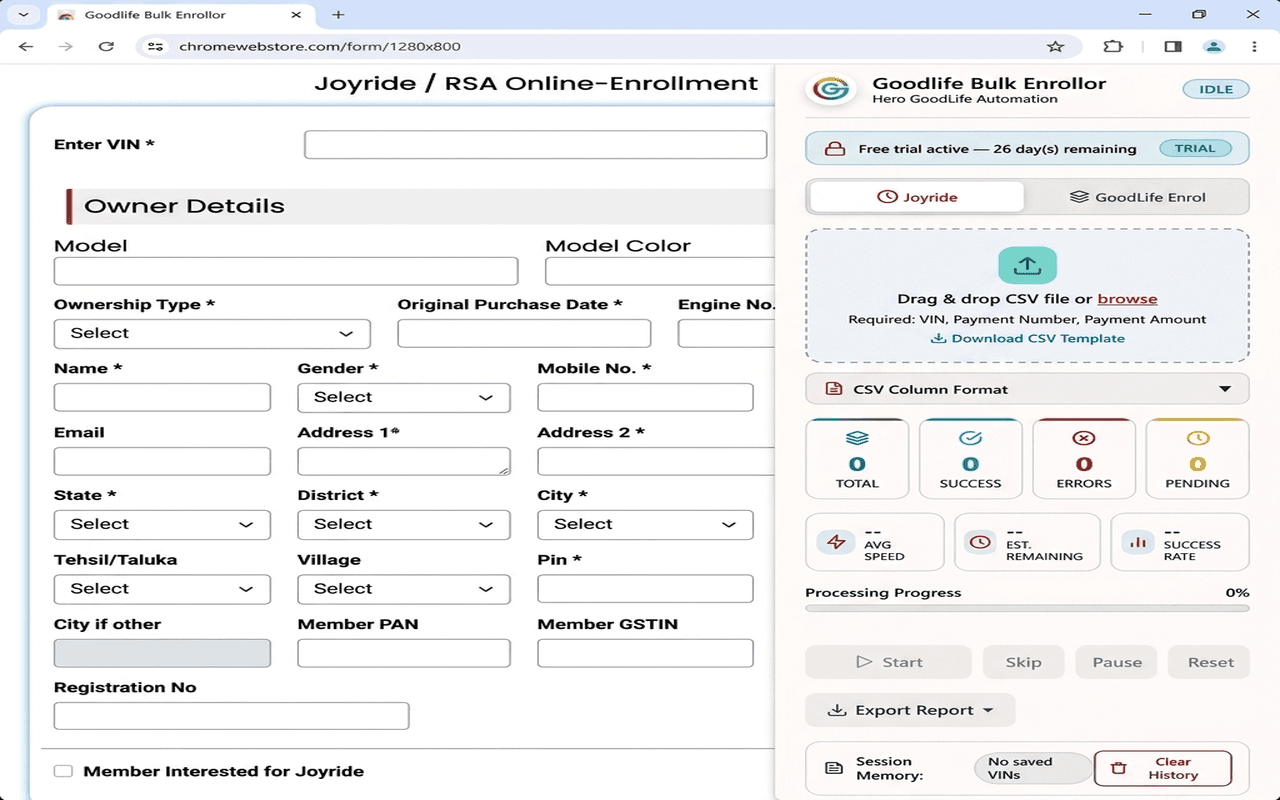
Click our extension icon in your Chrome toolbar to open Chrome’s native Side Panel.
Upload CSV & Automate Enrollments
Drag and drop your batch Excel file to process 50+ VINs in under 2 minutes!
🛠️Hero GoodLife Login Troubleshooting & FAQs
Session Timeout Error during Bulk Entry?
The official portal logouts after periods of inactivity. Goodlife Bulk Enrollor features auto-resilience that pauses your queue safely, allowing you to re-authenticate your hero goodlife login without losing batch progress.
Forgot Password or Locked Account?
If your dealer login credentials fail on hmclgoodlife.heromotocorp.biz/GoodlifeDLWeb/#/login, use the portal’s password recovery link or contact your Hero MotoCorp zonal IT administrator.
District Dropdown Loading Slow?
Our extension handles asynchronous state-to-district dropdown binding automatically, ensuring zero submission failures for customer GoodLife enrollments.
Get Goodlife Bulk Enrollor on Chrome
Install directly from the Chrome Web Store for 1-click GoodLife login & enrollment automation.
Open Web Store
Click Add to Chrome to visit our verified Chrome Web Store listing page.
Click Add to Chrome
Click the blue "Add to Chrome" button on the Web Store and confirm installation.
Automate GoodLife Login
Open your Hero MotoCorp portal, complete your Hero GoodLife login, and launch your bulk automation panel!
How to Use Goodlife Bulk Enrollor
Follow this simple 6-step walkthrough to automate Hero GoodLife login sessions and process batch vehicle enrollments in minutes.
Install & Pin Extension
Install Goodlife Bulk Enrollor from the official Chrome Web Store. Click Chrome's puzzle icon in your toolbar and pin the extension for instant 1-click access during daily operations.
Log In to Hero Dealership Portal
Open Google Chrome and navigate to the official Hero MotoCorp portal (hmclgoodlife.heromotocorp.biz/GoodlifeDLWeb/#/login). Enter your authorized credentials and complete your standard Hero GoodLife login.
Prepare Your Batch CSV File
Use Excel or Google Sheets to format your daily batch file. Include headers like VIN, CUSTOMER_NAME, MOBILE, DOB, and STATE. Download sample templates from our CSV guide section below.
Launch Side Panel & Select Mode
Click the Goodlife Bulk Enrollor toolbar icon to open Chrome's native Side Panel. Select your target form mode: Joyride Online Enrollment or GoodLife Enrolment.
Drag & Drop CSV and Start Automation
Drag and drop your batch .csv file into the upload zone. Review the queue count, set your processing speed slider (Turbo, Fast, Normal, Careful), and click 'Start Automation'.
Auto-Resilience & License Key Setup
For first-time use, copy your unique Device ID from the panel and enter your license key. If portal logout or network loss occurs, the engine pauses and safely resumes after re-login.
See the Automation Engine in Action
Experience how Goodlife Bulk Enrollor validates batch CSV records and processes vehicle enrollments in real time.
Engineered for Maximum Efficiency
Everything dealership staff needs to manage Hero GoodLife login sessions and process batch enrollments daily.
Adaptive Speed Engine
Self-calibrates execution delays during Hero GoodLife login & portal server response times, guaranteeing error-free enrollments.
Dual-Mode Automation
Seamlessly handles both GoodLife Enrolment and Joyride Online Enrollment with mode-specific CSV parsing and Angular form validation.
Smart Skip & Session Memory
Never process duplicate entries again. Remembers processed VINs across sessions and intelligently skips already-enrolled vehicles.
100% Offline Privacy
Zero external servers or telemetry. All customer VIN numbers, phone details, and records remain strictly inside your local browser storage.
Real-Time Analytics Dashboard
Live side panel UI displaying total queue size, completion rates, error breakdowns, processing speed, and interactive log filtering.
Auto-Network Resilience
Detects portal logouts or network dropouts, safely pauses your Hero GoodLife login queue, and resumes right where it left off.
CSV Structure & Format Specifications
Download standardized templates or review the required headers for your Excel batch files.
Instant Dealership VIN Format Validator
Test any 17-character chassis VIN to verify length, invalid ISO characters (I, O, Q), manufacturing year codes, and Hero MotoCorp WMI prefix.
| # | Header Name | Status | Example Value | Description / Rules |
|---|---|---|---|---|
| 1 | VIN | Required | MBLHA10EDBHK12041 | 17-character vehicle chassis number |
| 2 | REG_NO | Optional | MH02AB1234 | Vehicle registration number |
| 3 | COUPON_NO | Optional | CPN998877 | Joyride scratch coupon number |
| 4 | EMPLOYEE_CODE | Optional | EMP101 | Dealership salesperson referral code |
| 5 | PLAN_YEAR | Optional | 1 | Duration of plan (Default: 1 Year) |
Privacy Policy & Security Standards
Goodlife Bulk Enrollor is engineered with strict zero-telemetry local browser isolation for your dealership account.
Last Updated: August 1, 2026
1. Data Collection & Privacy Isolation
Goodlife Bulk Enrollor (“the Extension”) operates 100% locally inside the user’s Google Chrome browser environment. The Extension does NOT collect, transmit, store, or share any personal customer records or Hero GoodLife login credentials on external servers.
2. Local Data Processing
All vehicle chassis numbers (VINs), customer names, and contact numbers remain strictly within Chrome’s isolated chrome.storage.local browser environment.
3. Permission Disclosures
activeTab&scripting: Used exclusively to interact with DOM form elements onhmclgoodlife.heromotocorp.biz/GoodlifeDLWeb/#/loginduring enrollment.sidePanel: Displays the automation control dashboard within Chrome’s native side panel.storage: Stores local batch queue progress and offline license validation state.notifications&alarms: Triggers desktop alerts upon batch completion.
4. Security & Cryptography
Device license verification uses local AES-256-CBC hardware fingerprinting. No remote servers receive your goodlife login password or dealership details.
5. Contact Information
For privacy inquiries or technical support, contact CalcLabz at support@calclabz.com.
Frequently Asked Questions
The official portal for Hero GoodLife login is hmclgoodlife.heromotocorp.biz/GoodlifeDLWeb/#/login. Hero MotoCorp authorized dealership staff can access their account using their official dealer credentials.
Install Goodlife Bulk Enrollor from the Chrome Web Store, navigate to hmclgoodlife.heromotocorp.biz/GoodlifeDLWeb/#/login, complete your regular Hero GoodLife login, and launch the side panel to upload your batch CSV file.
Yes! Goodlife Bulk Enrollor features a one-click tab switcher that toggles between Joyride Online Enrollment and GoodLife enrolment forms across all GoodLife membership tiers (Pro, Silver, Gold, Platinum).
The extension's Auto-Resilience engine automatically detects portal logouts or internet drops. It safely pauses your queue and resumes automatically right where it left off once re-authenticated.
Open the extension side panel, copy your unique Device ID displayed on the screen, and email it to support@calclabz.com to receive your instant license key.